AI mascot generator: from one sentence to a full mascot pack
This AI mascot generator turns a short description, such as a friendly fox for a coffee shop, into four mascot drafts in about a second. Drafts are free and unlimited. Then pick one, and the pack adds 8 expressions, a looping animation, name ideas and, with a credit, clean PNG and SVG files.
By The Wobblemark team (Product and testing). Last updated .
How to use the AI mascot generator, step by step
First, describe your mascot in a few words, for example a friendly fox for a coffee shop.
Then add your brand name if you want initials on the belly badge.
Next, pick a main color or leave it on Auto, and choose Sticker, Flat or Soft.
Press Draw my mascot and look at the four drafts. Shuffle gives you four new ones.
Finally, choose the draft you like and press Make the mascot pack.
Drafts are always free, and the first 3 full packs each day are free too. After that, see the pricing page for packs and plans, or read how we test the tool.
AI mascot generator tested with a real description
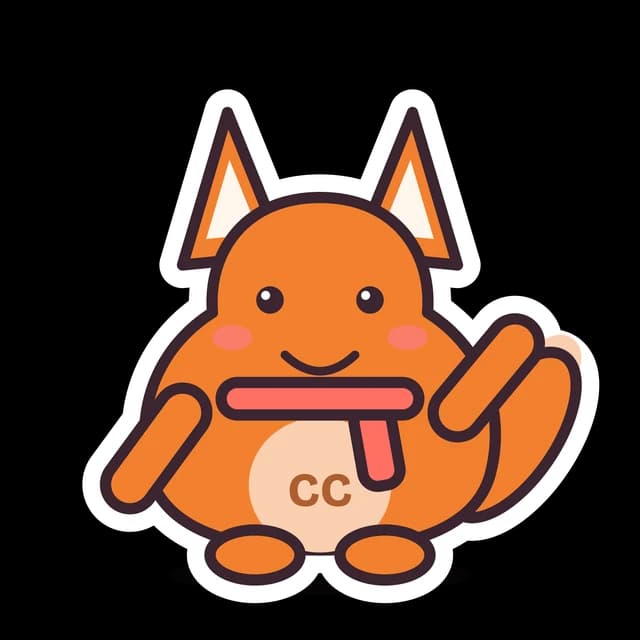
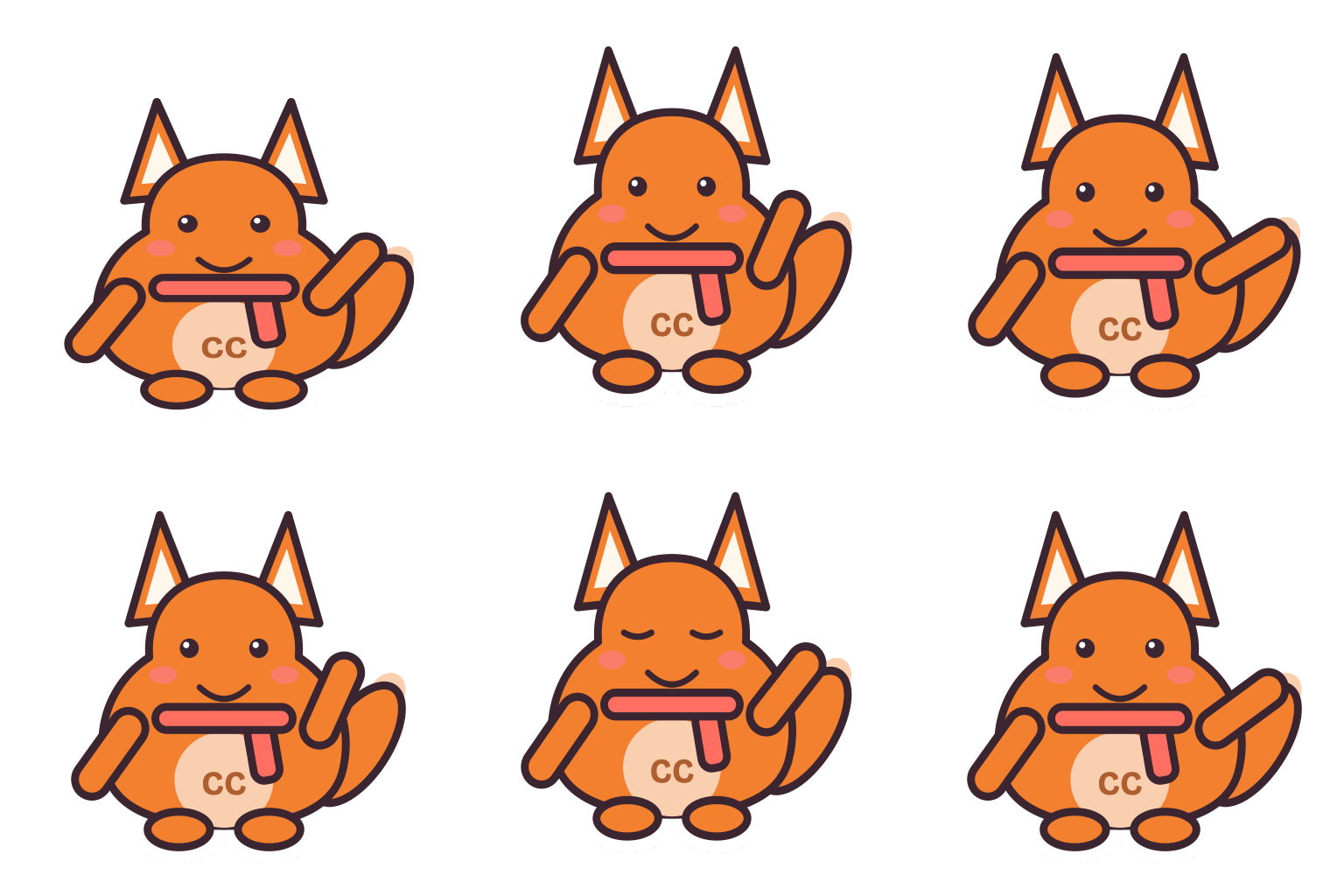
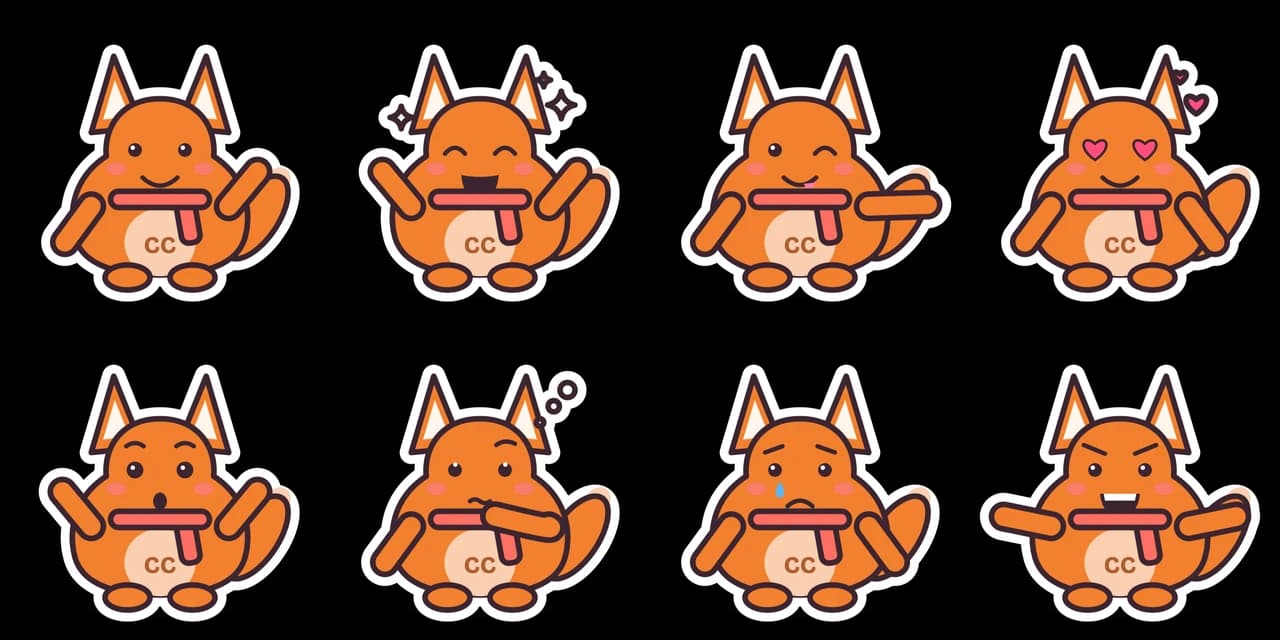
We typed this page's example into the studio and made the paid pack, with no edits. So the mascot, the sheet and the numbers below are exactly what the tool returns, and you can repeat the run yourself.
- Test input
- "a friendly fox for a coffee shop", brand Copper Cup, sticker style
- Result
- Mascot pack (paid, no watermark)
- Character
- fox + coffee bean
- Mascot PNG
- 2048 x 2048 px, 190 KB
- Mascot SVG
- 5 KB
- Expressions
- 8 (sheet + one SVG each)
- Animation
- 512 px GIF 279 KB, WebP 355 KB
- Name ideas
- Fizz the Fox, Coppo, Sir Copper
- Time to make
- 1.3 s for the whole pack
How we test: every guide runs its own example through the same engine, and we check each pack by hand. More on the about page.
What the AI mascot generator does with your words
You type a short description, between 3 and 160 characters. The tool reads it for keywords it knows, such as fox, coffee, robot, school or hockey. Each keyword points to parts: a body shape, a head piece, markings and sometimes an accessory. For example, coffee can add a warm brown color, and chef adds a chef hat.
So a few words go a long way. "A friendly fox for a coffee shop" gives fox ears, a warm palette and a cheerful face. In contrast, "a blue robot for a cloud hosting app" gives an antenna, a box body and cool colors.
You can also add a brand name. Its first one or two initials then go on the belly badge.
Four drafts first, then one pack
Draw my mascot returns four different drafts in about a second. Each one is a 320 px preview. They share your keywords but differ in body, eyes, markings or pose, so you get a real choice instead of four near copies.
Drafts are free and unlimited, with a rate limit to keep the server fair. If none of the four feels right, press Shuffle for four new ones.
When one draft fits, press Make the mascot pack. The pack keeps that exact character, so the mascot you picked is the mascot you get in every file.
What is in the mascot pack
The pack has three parts. First come 8 expressions, each with its own pose: Happy wave, Excited cheer, Wink and point, Love with heart eyes, Surprised, Thinking, Oops with a tear, and Game face with a flex. They work as stickers, chat reactions or website states.
Second, you get a looping animation. It has 16 frames at 70 ms, so one loop lasts about 1.1 seconds. The mascot bounces twice with a squash on landing, waves and blinks once. It comes as a GIF and as an animated WebP, and nothing in it flashes.
Third, the pack suggests 6 name ideas from your description and brand name, for instance Felix the Fox or Captain Copper.
Why our AI mascot generator has two engines
Most tools in this space send your prompt to an image model. Wobblemark gives you two tools instead. The free part runs our own vector mascot engine, which builds the character from drawn parts. Then the AI studio, for signed in users with credits, uses Google's Nano Banana 2.1 for images and Gemini Omni Flash for video.
The vector engine has real benefits. The same description and seed always give the same mascot. Every pose shows exactly the same character, with the same ears, colors and markings. Also, nothing gets invented by mistake, such as a sixth finger or a melted logo.
The AI studio, on the other hand, goes past the clean sticker look. It can start from your text, from a photo or a sketch, or from one of your vector drafts. So you can try both and keep what fits your brand.
What the AI studio adds
First, the studio draws a reference mascot in one of 9 art styles: Cartoon, 3D toy, Animated film, Plush, Pixel art, Anime, Chibi, Kawaii or Doodle. You can also upload a JPG, PNG or WebP up to 10 MB, such as a pet, a sketch or a product photo. Each image costs 1 credit.
Next, it draws new poses of the same character, such as waving hello, jumping with joy or sleeping, or any pose you type. It also adds outfits, for example a party hat, a superhero cape or a business suit. Stills download as a transparent 1024 px PNG.
Finally, any image becomes an animation of about five seconds for 10 credits. It takes 2 to 5 minutes in the background. Because the background is removed for you, you get a transparent GIF, a transparent WebM, a Lottie file and an MP4 on a flat key color.
Free pack or paid pack
Without an account, you can make 3 free packs a day. Each one has a 1024 x 1024 px transparent PNG, the expression sheet as one 1536 x 768 px PNG and a 320 px GIF loop. All three carry a watermark, and there is no SVG.
A paid pack costs 1 credit. It adds a clean 2048 x 2048 px PNG, the SVG of the mascot and an SVG for each of the 8 expressions. You also get the clean 2048 x 1024 px sheet, a 512 px GIF and a 512 px animated WebP, with commercial use.
Credits come from a monthly plan. Starter is $9 a month for 72 credits, Growth is $29 for 288, and Studio is $89 for 864. Credits carry over, and you can cancel anytime. So a full AI flow with a reference, a pose and an animation costs 12 credits.
When Wobblemark is not the right tool
Be honest about the job first. This tool does not make a photo-real mascot or a costume design, and it cannot match an existing character exactly. The vector engine does not draw a real breed, a person or a logo you upload. Likewise, the AI studio does not draw real public figures.
Also, the AI studio makes short loops of about five seconds, not long videos, and it does not do speech or lip sync. In addition, AI results vary between runs, so the character can drift slightly between poses. For a talking mascot or a detailed scene, an animator or an illustrator fits better.
AI mascot generator at a glance
| Item | Details |
|---|---|
| Input | Description of 3 to 160 characters, optional brand name, color and style |
| Drafts | Four 320 px previews in about a second, free and unlimited (rate limited) |
| Styles | Sticker, Flat or Soft |
| Pack | 8 expressions, a 16 frame loop (GIF and animated WebP), 6 name ideas |
| Free pack | 3 a day, 1024 px PNG, 1536 x 768 px sheet, 320 px GIF, all watermarked, no SVG |
| Paid pack | 1 credit: 2048 px PNG, SVG of the mascot and of each expression, 512 px GIF and WebP |
| AI studio | 9 styles, poses, outfits, photo input; 1 credit per image, 10 per five second animation |
| Prices | Starter $9 a month for 72 credits, Growth $29 for 288, Studio $89 for 864 |
| Speed | Drafts about 50 ms on the server, paid pack about 1.3 s |
AI mascot generator FAQ
Is this AI mascot generator free?
Drafts are free and unlimited. You also get 3 free packs a day with a watermark and no SVG. Clean files and SVGs cost 1 credit per pack.
Does it use an image model?
The free vector maker does not, because it builds the character from parts. The AI studio does: it uses Google's Nano Banana 2.1 for images and Gemini Omni Flash for video. Every AI result carries Google's invisible SynthID watermark.
Will my mascot look the same in every pose?
In the vector pack, yes, because the engine reuses the same parts for every expression. In the AI studio, poses stay close to the reference, but the character can drift slightly, since AI results vary between runs.
Can I make a mascot from a photo of my dog?
Yes, in the AI studio. Upload a JPG, PNG or WebP up to 10 MB, and it draws a mascot from your pet, sketch or product photo. However, the free vector maker works from text only.
Can I use the mascot for my business?
Yes, with the paid pack. It includes commercial use. The free pack carries a watermark, so it suits testing and drafts rather than a launch.
Do you store my description?
No. We use it for that one request only. Our job log keeps just the action, the style, the time and whether it worked.